The back‑office brain for businesses that sell online.
AI that runs your shop's back office, and remembers everything.
True StoriesSee Stream Shop AI at work in a real businessStream Shop AI runs on your own Claude or ChatGPT account, so it does require a paid plan, starting at about $20 a month. Claude Pro or ChatGPT Plus, or anything higher, is all you need, and we're happy to help you get set up.

Maple Lane Goods is an invented example business: a candle maker and online seller with a small studio in Ohio. Every screen on this page is the real software, running with Maple Lane's sample data.
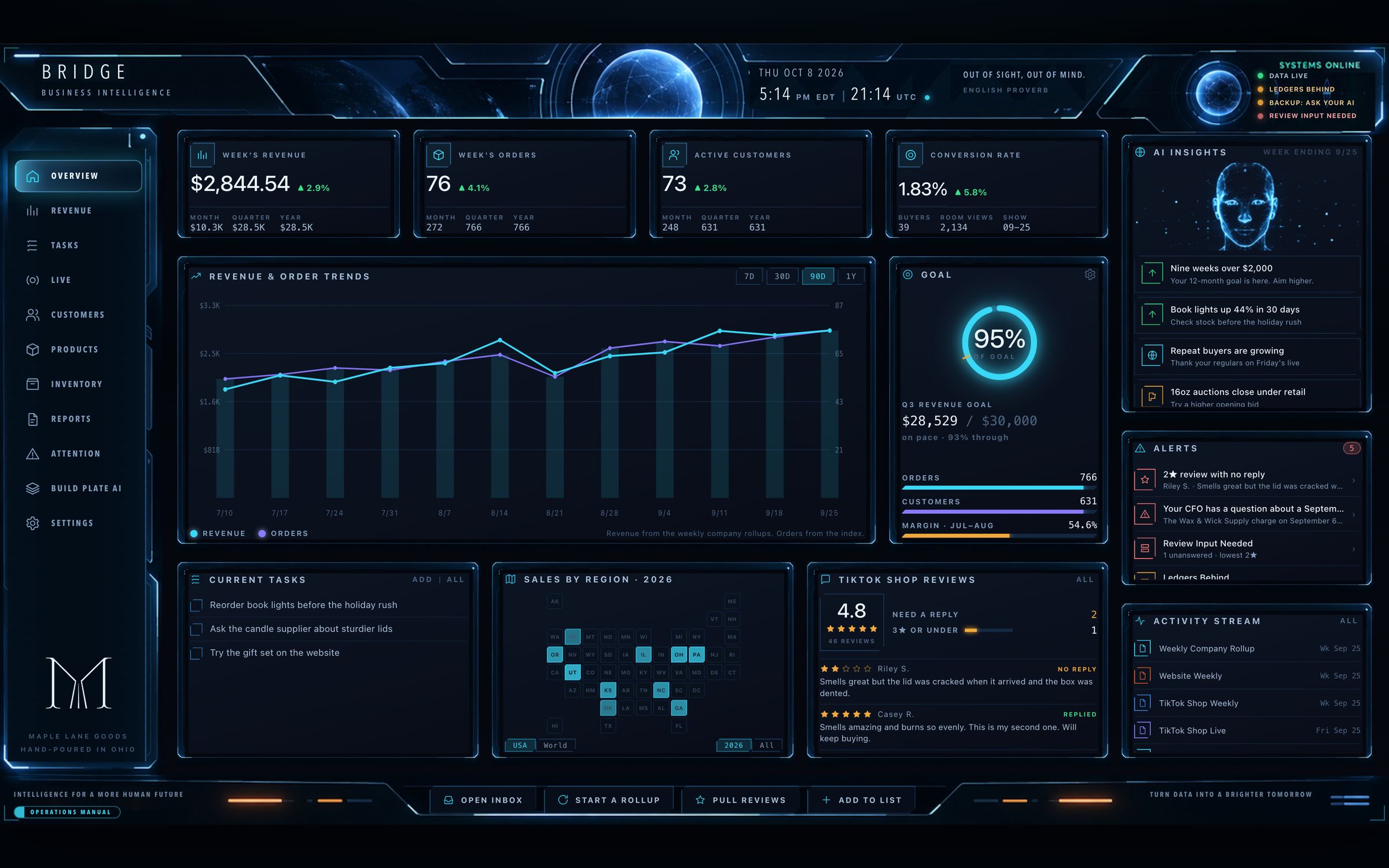
Real software, example shop. Maple Lane Goods is an invented business, and every figure shown is sample data.
Selling online leaves your numbers in pieces.
Every platform has its own dashboard, its own reports and its own fees. Stream Shop AI brings them together on your own computer, and gives your AI assistant a lasting memory of your business.
Your sales come in from everywhere.
TikTok Shop, Etsy, Shopify and your live events each give you a different kind of report. Your weekly rollup brings them together in one clear, easy-to-read report by revenue stream, with your AI assistant's analysis of what it all means.
Every fee gets its own line.
Your Profit & Loss shows each platform's fees on a line of their own. Etsy's fee statement is broken out by fee type, to the cent. TikTok Shop's fees and shipping charges each get a line of their own. Wherever you sell, you always know what you were charged.
Your AI assistant picks up where you left off.
An AI assistant by itself doesn't remember a conversation once the conversation ends. Your vault is where your AI assistant remembers, so each conversation starts from everything it already knows about your business.
Built for resellers, makers and live sellers, from side hustle to full time.
Yours to keep, portable to any AI model.
On its own, an AI model forgets your business when the conversation ends. Your vault gives your AI assistant a lasting memory on your own computer: your notes from every session, your records and your decisions, in plain files any AI model can read. Your vault is now your AI assistant's persistent memory.
Not locked to us, not locked to anyone. You own it, and you can carry it forward to whatever comes next in the AI landscape.
Unless you choose to share it. Your Bridge settings, themes, stock, shows and devices all live in the vault.
The engine is ordinary Python and the skills are written in plain language, with a guide so other AI tools can step in.
Runs in the Claude Code tab of the Claude desktop app, or in Codex in the ChatGPT desktop app, on your own paid plan.
Software that changes when you ask it to.
Most software works the way it shipped. When you want something new, you wait for an update, or keep paying every month and hope it comes. Stream Shop AI is a working foundation that you shape yourself just by talking with your AI assistant.
You take the software as it comes.
- You pay every month for apps you can't change.
- Something new arrives only when the company sends an update.
- You email support or file a ticket to ask for what you need.
- Platform reports come the way the platform builds them.
You ask, and the change is built.
No coding, just a conversation. As your business grows and changes, Stream Shop AI grows and changes with you.
Four steps to your weekly numbers.
Working with your AI assistant, you download the reports your Bridge lists for each platform, drop them into your Stream Shop Inbox, and let your AI assistant know they're waiting. Pour your coffee, sit back, and soon you're reading your own custom report, complete with AI insights about your week.
Start a Rollup
When your week ends, press Start a Rollup on your Bridge and choose your weekly report. Everything the report needs is already set up for you.
Drop your files
Guided by your AI assistant, download your reports and drop them into your Inbox, or onto any page of the Bridge.
Paste one line
Once your files are in, your Bridge gives you one line to copy. Paste it to your AI assistant, and your AI CFO agent goes to work building your report.
Everything updates
The moment your report is filed, every page of your Bridge updates automatically, showing your week, month, quarter and year to date.
Every part of your shop, one click away.
Beyond the Overview, the Bridge has a page for each part of your business. Tap through them below.
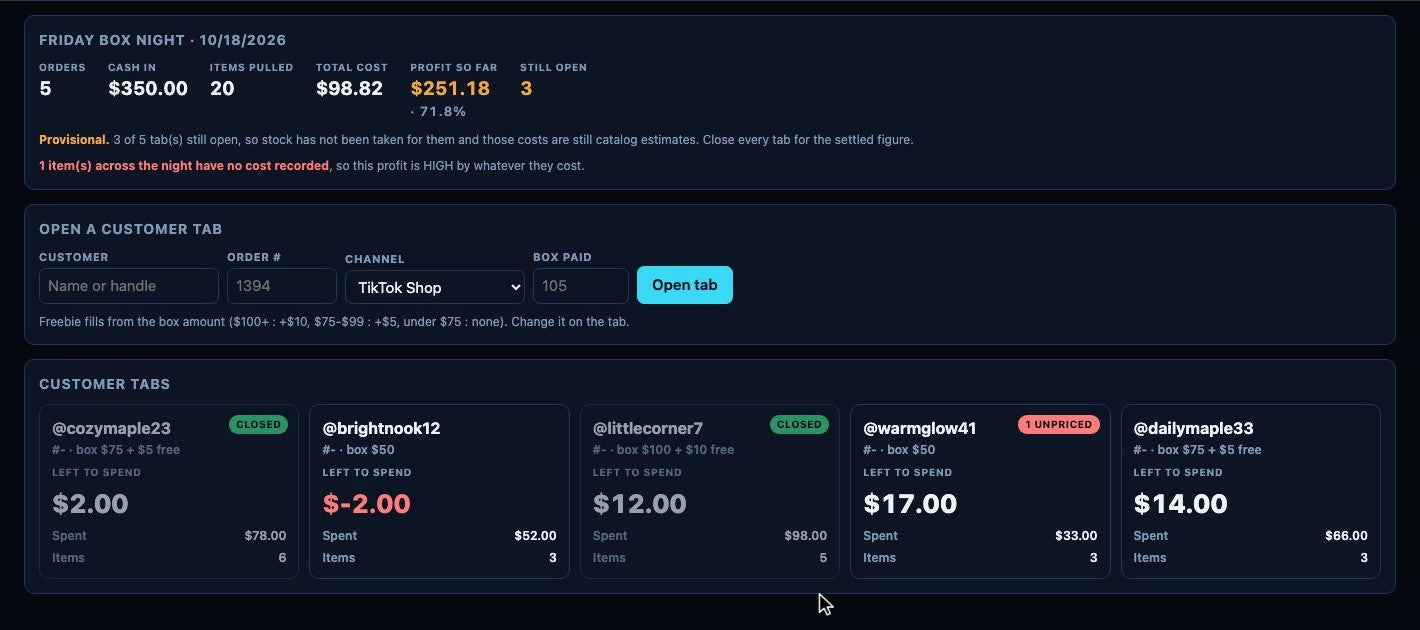
Every box on your live show, kept straight.
Selling boxes on a live show? A customer buys a box at a set price and fills the box item by item while you're live, but the platform only records one box. Box Builder keeps track of what went in every box, what each customer has left to spend, and what the night earned.
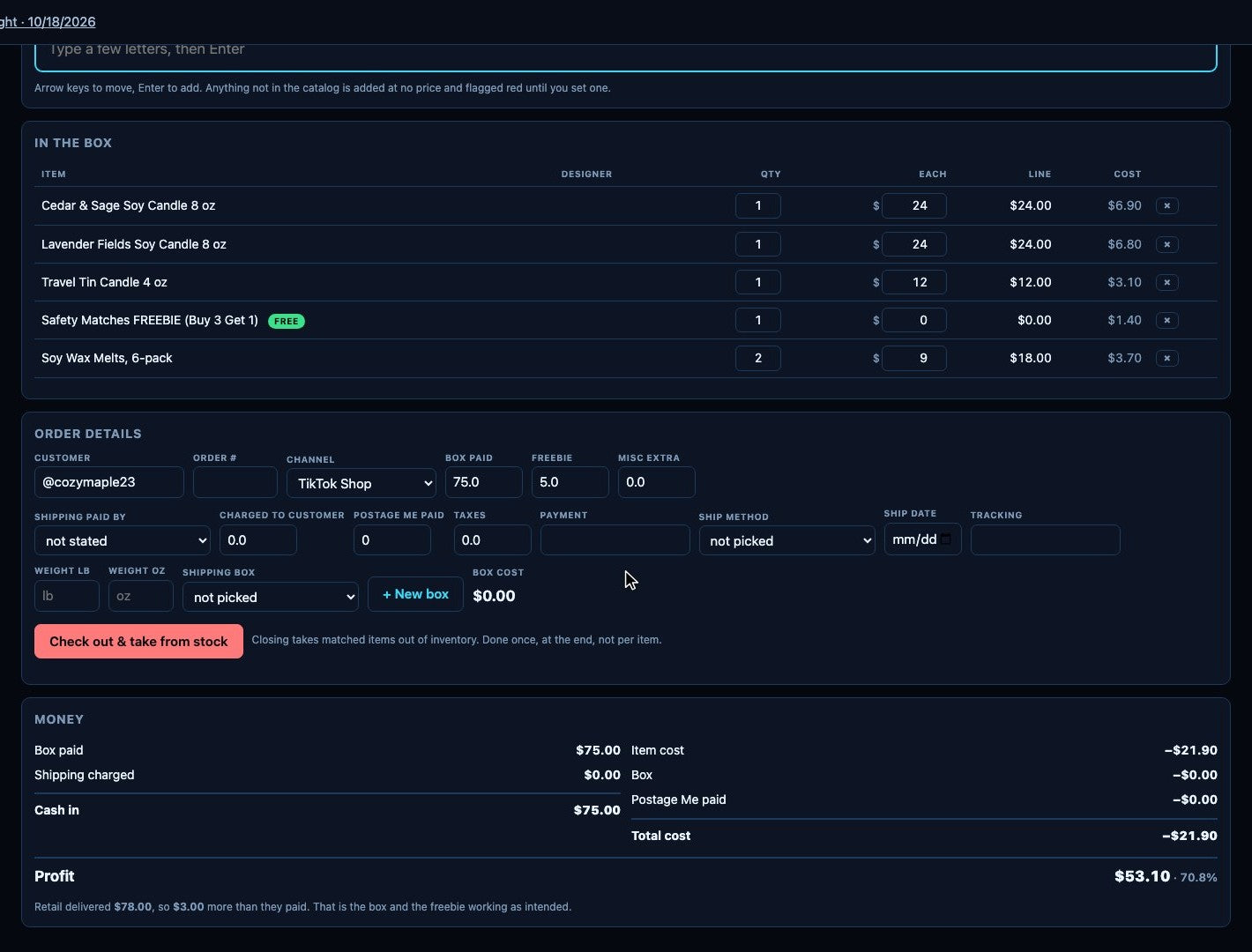
Every box, item by item.
- Each tab shows what your customer paid and what they have left to spend, in red if they go over.
- Freebies fill in from the box amount. Run a Buy 3 Get 1, and the tab counts down to the next free item.
- Pull an item by typing a few letters and pressing Enter, so you can keep talking to your customers.
- The money panel shows cash in against cost, and the retail value that went out against what your customer paid.
- Order details hold the shipping: who paid, the postage, the shipping box and the tracking number.
- When the box is packed, press Check out & take from stock once, and the items come out of your Inventory.
- Fill boxes from an iPad on your home network during the show.
Customize your Bridge.
You sit down with your Bridge every day, so it should feel like yours. Start from one of four built-in themes, or choose your own colors, fonts, corners and logo. A theme changes how the Bridge looks, and every box and figure stays exactly where it is.

Your colors, your fonts and your logo.
- Five colors: accent, background, panel fill, panel edge and text. Your changes show on the whole screen as you make them.
- Pick a display font for your titles, clock and menu, and a body font for everything else.
- Give every box on your Bridge chamfered, round or square corners.
- Save your new theme under any name you like, and it's marked “Yours” in your theme list.
- Upload your logo and choose how the logo is colored on each theme.
- A line under the picker warns you when your text color is too close to your panel color.
- Pictured: the Customize panel at work on Maple Lane, a theme made for our sample shop and marked “Yours” in its theme list.
The small things that make your week easier.
Each one helps you see exactly where your shop stands, without working through every platform's dashboard on your own.
Your week, read against the world.
After each weekly rollup your AI assistant writes 4 to 8 insights from the whole business and the outside world: rates, jobs, spending, the holiday outlook, platform news. They're ranked by how much each could change a decision. Open one for the story, a question worth sitting with, and the evidence.
From the Maple Lane demo
When it needs an answer, it asks you.
When something in your books needs your judgment, your AI CFO agent posts a question on the Attention page. Copy it and answer in your AI assistant.
Point at it.
Every part of the Bridge comes with clear instructions in your Operations Manual: how it works, and why it works the way it does. The full guide lives inside the Bridge, in the lower left corner of every screen, and opens to the page you’re on. Press “Point at it,” click any box, and the manual opens to that section. “Show me” instantly lights that box up on your screen. You can always ask your AI assistant, and everything is laid out for you here too.
Every fee on its own line.
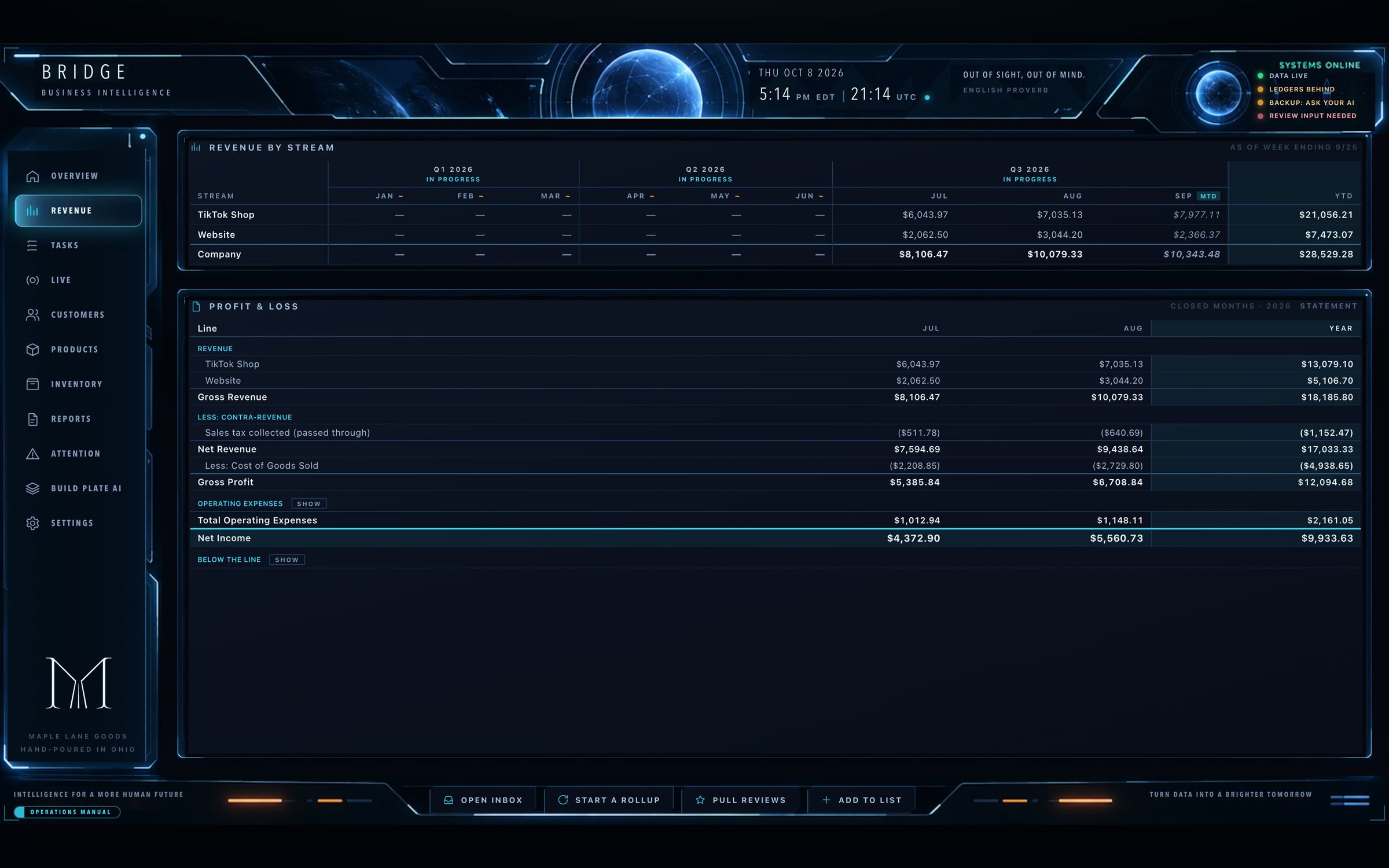
See what you actually kept after every platform takes its share. Turn on your Profit & Loss, and each platform’s fees, your shipping and your other costs sit on a line of their own, all brought together in one place. The Profit & Loss is optional, so you can keep your books where they are if you prefer.
| Gross revenue | $10,079.33 |
| Sales tax passed through | ($640.69) |
| Cost of goods sold | ($2,729.80) |
| TikTok Shop: platform fees | ($562.65) |
| Shipping & postage | ($353.29) |
| Bank & payment fees | ($12.00) |
| Net income | $5,560.73 |
Count it any way you like.
A listings export, your own spreadsheet, or even a photo of a handwritten list. Drop it in your Inbox and tell your AI assistant “Count my stock.” You always see a preview first. Nothing is written until you say yes.
amber jars 12
book lights 9
Live box sales, kept straight.
Selling boxes on a live show? Box Builder gives each customer a tab with what went in their box and what they have left to spend. Box Builder has a section of its own, with a video.
See Box BuilderSee your pace, not just your total.
Set a goal by week, month, quarter or year, and the Bridge records the result when each period ends. Then your Bridge asks whether you’d like to keep the same goal for the next period or set a new one.
A drafted reply for every review.
Reviews that need a reply arrive with a draft. “Copy reply” copies the words and marks the review replied, with an “Undo.” Sensitive reviews get a suggested approach instead of a script.
Lost, stolen or broken in the mail? Ask, and the facts come to you.
Every order, customer and review lives in your vault. Ask your AI assistant in plain words and it pulls everything around the order into one summary you can hand to a carrier, an insurer or the customer. Nothing is sent without your okay.
Your Bridge on the tablet, the laptop, the TV.
Add a device with a one-time link, with no passwords and no accounts. The Bridge is never on the open internet, and Build Plate AI opens on the same devices.
People, not accounts.
When two accounts look like one buyer, the Bridge shows them side by side with the evidence. They merge only when you say so.
Two apps, one business.
The Bridge runs your shop. Build Plate AI is your production house: what you make, what it costs, your product photos and labels, your wholesale orders and your machines.
Build Plate AI automatically saves everything you make, count and create into the same vault as your Bridge, so all of your work sits in one place. The two apps talk to each other right on your own computer and home network. Each app keeps its own records and shares what matters with the other, such as your stock counts.
Production folder, right beside your Bridge's files and your AI assistant's memory.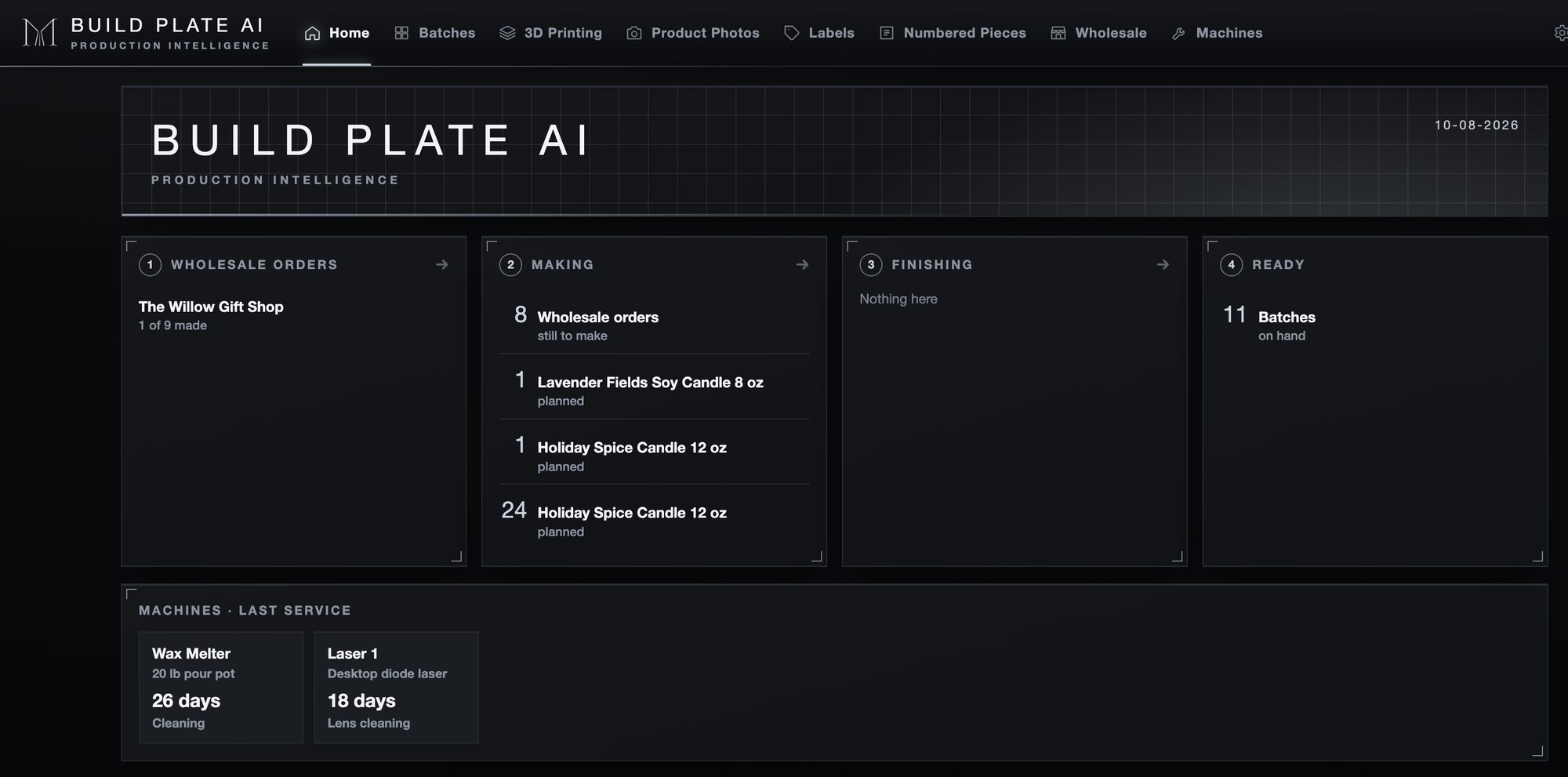
THE BRIDGE
Runs your shop- One list of everything you sell, made and resold
- Prices: retail, sale and auction
- Stock, sales, customers and the books
BUILD PLATE AI
Makes the products- Batches, 3D printing and numbered pieces
- True cost per unit from real materials
- Photos, labels, wholesale and machines
Here's one example of how the two apps work together.
Maple Lane starts a batch of Holiday Spice candles. The wax, wicks and jars come straight out of the Bridge's Inventory.
Build Plate AI · BatchesMaple Lane prints round labels for the Holiday Spice candles from a created design, ready to go on once the candles are done.
Build Plate AI · LabelsThe batch is done with 23 candles. Build Plate AI counts them, and the Bridge's Inventory shows 23 more on hand.
Build Plate AI → the BridgeMaple Lane goes live on TikTok and sells a candle box, with the buyer picking three scents during the show. Maple Lane fills the order in Box Builder.
The Bridge · Box BuilderBack on the Bridge, Maple Lane starts a rollup for the live show and drops in the reports from TikTok Shop. Their AI assistant builds the show report for a detailed review.
The Bridge · Live
 Your photoShop image
Made by Build Plate AI on the Maple Lane demo, untouched
From a phone photo to a shop image.
For any product, take a quick photo, and Build Plate AI separates the product onto its own layer, straightens it and sets it on the background you choose, with an optional soft glow, so every image in your shop looks like part of the same set.
- Turn the title, footer and logo on or off.
- Review every image: turn it a degree, redo it, or tap for full size.
- Download your images as a zip file, ready for every platform you sell on.
- All it takes is a quick photo of your product.
- Your images are made and saved on your own computer, so making them costs you nothing.
Design a label once, and print a roll whenever you need one.
Save a label by name, then type how many, up to 1000 at a time, and press Print. The mock-up on screen shows exactly what will print.
- Five lines, each with its own font, size and color. On a round label the top and bottom lines curve.
- A barcode or QR code from the item's SKU, the same SKU your point-of-sale system uses, so scanning the label finds the item.
- Made for label rolls. Each label prints as its own page at the exact size, so a thermal printer runs fifty labels as one continuous strip.
- Labels on letter-size sheets, such as Avery, are set up for your exact sheet by your AI assistant.

Know the cost of every print.
Measured numbers win. Grams and print time come from your own measurement first, then the same product on the same machine model, then the product list.
- Grams and print time are read straight from your sliced file, a .3mf or .gcode, or from a slicer screenshot dropped in the Inbox.
- Quick print · R&D for test prints and new designs: each one is costed, and nothing is added to your products.
- Add a product is a conversation with your AI assistant: the name, SKU, designer, grams, print time, Hardware and your prices.
- A failed print is recorded as shrinkage, never added to the unit's cost.
- Every print's hours go to its machine, failed attempts included.
- Your AI assistant can quote a print you haven't made yet, with the cost, profit and margin.
For things made several at a time.
- Name your own finish step, such as Curing or Packaging.
- The supplies that make up the batch are taken from your Bridge's Inventory as soon as you press Start.
- The cost of each piece is the materials divided by how many are made.
- Once the batch is done, the Bridge automatically counts the new products and adds them to its stock.
- Hours are recorded, and they become a cost only when you tell your AI assistant what an hour of your work is worth.

See what every wholesale order earned.
- Drop the Faire order PDF in your Inbox, and your AI assistant brings in every line and fee.
- Ordered items are matched by SKU, then by exact name. A close match waits for you to confirm, and then the answer is remembered.
- Take from stock fills a row from your batches, oldest first, each piece with its exact cost from the batch it was made in.
- As you pack, tag each item with its shipping box, B1 through B9, and the order keeps a list of what's in every box, with each box's size, weight and tracking number.
- Record Faire's deposit, and the order shows what you earned after every fee, your packaging and your shipping.
- Ask your AI assistant about any order, from this week or a year ago, such as "How many times has Corner Gifts ordered from us?"
- Built for Faire, and your AI assistant can set up any other wholesale platform you sell on.

One-of-a-kind, every one tagged.
For hand-dyed clothing, pottery, carved wood, jewelry and vintage finds. A run of new pieces gets its tag numbers, its labels and its finished images in one place.
Live auctions too. Print numbered labels 100 to 119 before the show and put one on each piece. Whoever wins auction 100 is shipped the piece labeled 100.
Count stock · 16 on the rackTap a tag to untick it. Sales since your last count arrive already unticked. Your count always wins.
A service book for any machine.
A 3D printer, a laser cutter, a sewing machine, a kiln, a wax melter, a heat press.
- Add a machine is a conversation: your AI assistant gathers the model, warranty, documents and the maker's own service schedule.
- Reminders by days or by use. Hours from batches and 3D prints add up on their own.
- Log a repair, and Machines tells you whether the warranty still covers it.
Built by sellers. Used every day.
Steve Johnston has been building businesses since 1995, when he founded Mythic Visions, an early ecommerce company running five online stores for niche markets around the world. Since then he has built websites, online stores and database systems for companies, directed technology for major educational institutions, built and accredited a graduate program, and earned a doctorate in clinical psychology. Wherever he works, he rebuilds how the operation runs so the people in it can do their best work.
Today Steve builds with AI. He runs American Carver, a multi-channel commerce company selling on TikTok Shop, Faire, Shopify, Amazon and DriveThruRPG, and he designed and built the AI operating layer that runs its back office every day: finances, inventory, reporting, customers and planning. That system became Stream Shop AI, tested and refined through real daily work before its release. His psychology training shapes how he builds: technology that fits the way people actually think and work.

Hone your AI know-how.
AI is changing how we live and how we work. The Growth Community is where you learn it, at your own pace, alongside people doing the same. Open to anyone. You don't need Stream Shop AI to join.
Courses in the Learning Center, from Introduction to AI to AI Applications in Business.
Regular sessions, each with a topic and time for your questions.
People learning AI together, sharing what works.
Put Your AI to Work Today
You'll also need your own paid Claude or ChatGPT plan, starting at about $20 a month. Stream Shop AI works with the one you choose.
Stream Shop AI
The Bridge, your AI assistant and AI CFO agent, and the vault.
- The Bridge
- The vault, persistent memory for your AI and your business
- Weekly, live show and monthly rollups with the CFO's read
- Profit & Loss reporting
- Inventory, customers and the review desk
- 30 days of Ask Joey and a free 7-day pass to the member area
Requires a paid Claude or ChatGPT plan, about $20 a month. Mac or Windows.
Stream Shop AI + Build Plate AI
Run the shop and the production house, together.
- Everything in Stream Shop AI
- Batches, 3D Printing and Numbered Pieces
- Product Photos and Labels
- Wholesale, built for Faire
- Machines with service reminders
- Both apps share one vault and one set of stock
Requires a paid Claude or ChatGPT plan, about $20 a month. Mac or Windows.
Build Plate AI add-on
Installs into the vault you already have. It adds a Build Plate AI button to your Bridge and keeps every record you've made.
- Save $24.99 and pay only $25 if purchased within 30 days of buying Stream Shop AI by itself
- Your free 30 days of Ask Joey and 7-day pass to the member area begin with your Stream Shop AI purchase. The Build Plate AI add-on does not alter or extend that original time frame.
For Stream Shop AI owners. A short form confirms your purchase, then we send your checkout link. Uses the same paid plan you already have.
Growth Community
Join by January 1 and keep $14.99 for as long as you stay.
Learn to use AI in your life and your business, alongside others doing the same. Open to anyone. Cancel any time.
Billed $14.99 every month until you cancel. Cancel any time from your account. Cancellation policy
- Online courses in the Learning Center: Introduction to AI, Going Further with AI and AI Applications in Business
- Platform deep dives: Etsy, TikTok Shop live auctions, live box selling and more
- Regular live sessions, each with a topic and time for open questions
- The members' community: people learning AI together
- Growth Points for taking part and sharing your referral code. Every 1,000 points earns a free month
- A prize each month for the three members with the most points
- 25% off private coaching and consultation sessions
- Ask Joey, our private AI help desk specialist, for help with the software for as long as you're a member
- Download one member-only add-on each month and plug it straight into your Stream Shop AI, from hand-painted themes to TikTok Live Gifts
Still wondering how it works?
Which monthly plan is required?
With Claude, Stream Shop AI runs inside Claude Code, which comes with Anthropic's paid Claude plans. The Pro plan, at about $20 a month, is all you need. With ChatGPT, Stream Shop AI runs in Codex in the ChatGPT desktop app, and the Plus plan, at about $20 a month, is all you need. Any plan above those works too. Stream Shop AI doesn't run on a free plan. If you already have one of these plans, you're all set.
Does it matter which one I pick? Is one better?
Either one runs Stream Shop AI well. If you already use Claude or ChatGPT on a paid plan of about $20 a month or more, stay with the one you know. If you use neither, we recommend Claude. Stream Shop AI was written with Claude and tested thoroughly on Claude over the last eight months, so that's where we know it best. The ChatGPT edition is the same software and has been thoroughly tested too. Claude wrote that code as well, and ChatGPT adjusted it to run smoothly on its platform.
What are Claude Code and Codex?
They're the parts of Claude and ChatGPT that work with code and the files on your computer. Claude Code is in the Claude desktop app, and Codex is in the ChatGPT desktop app. Both come with your paid plan. You still just chat, in plain English, the same way you do now. The difference is behind the scenes: Claude Code and Codex write and change code, which the regular chat doesn't do. Your AI assistant handles all of that for you.
I don't have either plan yet. Which should I get?
We recommend Claude, on the Pro plan at about $20 a month. Stream Shop AI was written with Claude and tested thoroughly on Claude over the last eight months, so that's where we know it best. The ChatGPT edition is the same software and has been thoroughly tested too. Claude wrote that code as well, and ChatGPT adjusted it to run smoothly on its platform.
Which model should I use with Claude or ChatGPT?
For everyday work, start on a lighter setting. With Claude, use Opus 5.5 on Low if your plan offers it, or Sonnet 5.5 on Low. With ChatGPT, use GPT-6.1 Sol on Light, the model your ChatGPT edition starts on. You can also ask your AI assistant to write code, such as adding new abilities to your Bridge or changing the software. For that kind of work, move up a step if your plan offers it. With Claude, use Opus 5.5 on Medium or higher. With ChatGPT, use GPT-6 Astra on Medium or higher. Higher settings use more of your plan's usage, so move back down for everyday work. These names and settings are current as of November 1, 2026.
Can I use a Mac or Windows machine?
Both work. Stream Shop AI runs the same on a Mac and on Windows, with Claude or ChatGPT. You install the Claude desktop app or the ChatGPT desktop app. Your AI assistant then checks for Python, a free tool Stream Shop AI runs on, and helps you add it if your computer needs it. That's all you need on a Mac, and on Windows with ChatGPT. On Windows with Claude, there's one small extra step: Claude Code needs a small free tool called Git to open your folder, and Macs already include it. You install Git once by following one short step in your Getting Started guide. You accept the default options, and from then on your AI assistant handles everything else. You never have to open Git yourself.
Do I need to know how to code?
No. Stream Shop AI is built for sellers, not developers. There's no code to write and no technical setup maze. You work in plain language, and the guided setup walks you through what to do step by step. Stream Shop AI works in the Claude Code tab of the Claude desktop app, or in Codex in the ChatGPT desktop app, because your AI assistant does all the coding for you. You talk to your AI assistant there the same way you would anywhere else: in plain English, as an open conversation.
What if I sell on more than one platform?
That is exactly what Stream Shop AI is built for. When your sales are spread across TikTok Shop, Shopify, Etsy, live selling, manual orders, or other channels, Stream Shop AI helps bring the numbers into one clear place, so you can understand what actually happened each live event, each sales week, and each sales month.
Do I need Build Plate AI?
You need Build Plate AI when you make what you sell, or when you want shop-ready product photos and labels. Stream Shop AI runs your whole shop on its own. Build Plate AI adds the making side: batches, 3D printing, numbered pieces, product photos, labels, wholesale and machines. Your vault comes with Stream Shop AI. You can add Build Plate AI any time, and it installs into that same vault, keeping every record you already have.
Can I keep my books in QuickBooks or with my accountant?
Yes. The Bridge doesn't replace the way you already keep your books. Switch the Profit & Loss off, and the Bridge still builds your revenue from each platform's reports, which gives you a second count to check your books against. You can also keep everything in the Bridge, or use both. The Bridge isn't tax software and doesn't file anything for you.
What do I get when I buy?
You get the software to download, with a short guide to install it and give your AI assistant its first message. All of the training is in the Operations Manuals built into the Bridge and Build Plate AI, with videos on this site. You also get 30 days of Ask Joey, our private AI help for the software you bought, and a free 7-day pass to the Growth Community member area.
What does Build Plate AI need to run?
Build Plate AI runs on the same computer as your Bridge, on a Mac or Windows, with the same paid Claude or ChatGPT plan. Build Plate AI sets itself up the first time it opens, which needs the internet once. Product Photos needs macOS 14 Sonoma or later on a Mac. On Windows, the first time you make images, Build Plate AI downloads a free cut-out model of about 176 MB.
Do I need Stream Shop AI to join the Growth Community?
No. Anyone can join. If you own Stream Shop AI, your membership also brings Ask Joey and a member add-on every month.
Is my data secure?
Yes. Your setup lives in your own workspace, with your own files. You control your data, your reports, and your business knowledge. We have no access to your information or data and cannot see any of it. One important distinction: while we never see your data, the AI model you choose does process whatever you send it to work on. We encourage you to read the privacy policy of your preferred AI model, and to revisit it from time to time.
Your AI business system is already built.
Get the vault (your second brain), along with the AI CFO agent, the AI personal assistant setup, AI skills, guided workflows, and the seller-tested structure we built through months of real-world use.
Stream Shop AI runs on your own Claude or ChatGPT account, so it does require a paid plan, starting at about $20 a month.